...

Go Back   Lateral-g Forums > Lateral-G Open Discussions > Artwork and Collectibles
User Name
Password


Reply
 
Thread Tools Display Modes
  #1  
Old 02-07-2008, 05:59 AM
jamescarrell's Avatar
jamescarrell jamescarrell is offline
Junior Member
 
Join Date: Dec 2007
Location: EL Paso, tx
Posts: 17
Thanks: 0
Thanked 0 Times in 0 Posts
Default Renderings?

What program do you use?
__________________
"Become a man without losing the boy in you"
Reply With Quote
  #2  
Old 02-07-2008, 07:52 AM
mlomaka's Avatar
mlomaka mlomaka is offline
Senior Member
 
Join Date: Jul 2007
Posts: 186
Thanks: 0
Thanked 0 Times in 0 Posts
Default

I have been using Hand 2.0 for quite a while now. I have just started using PS 6, but even that is just to get my hand renderings to look a little better and get them in electronic form. I haven't quite figured out how to go completely digital yet.
__________________
Mike Lomaka
LCD
Lomaka Conceptual Design
http://mlomaka.wix.com/lomakaconceptdesign
Reply With Quote
  #3  
Old 02-07-2008, 10:27 AM
jamescarrell's Avatar
jamescarrell jamescarrell is offline
Junior Member
 
Join Date: Dec 2007
Location: EL Paso, tx
Posts: 17
Thanks: 0
Thanked 0 Times in 0 Posts
Default

Quote:
Originally Posted by mlomaka
I have been using Hand 2.0 for quite a while now. I have just started using PS 6, but even that is just to get my hand renderings to look a little better and get them in electronic form. I haven't quite figured out how to go completely digital yet.
got ant examples of ones that you have touched up on PS
__________________
"Become a man without losing the boy in you"
Reply With Quote
  #4  
Old 02-07-2008, 10:44 AM
ZVT's Avatar
ZVT ZVT is offline
Senior Member
 
Join Date: Jun 2007
Location: Floriduh!!
Posts: 198
Thanks: 0
Thanked 0 Times in 0 Posts
Default

I use adobe illustrator/photoshop,paint shop pro and xara x.

For my 3d stuff I use 3d studio max or rhino

mostly work in photoshop though.
__________________
ZVTDESIGNS-AUTOMOTIVE ARTIST AND VEHICLE DESIGN

[SIGPIC]https://lateral-g.net/forums/image.php4?type=sigpic&userid=4368&dateline=121287 1168[/SIGPIC]
RENDERING GALLERY!!
Reply With Quote
  #5  
Old 02-08-2008, 07:41 AM
city_ofthe_south's Avatar
city_ofthe_south city_ofthe_south is offline
Senior Member
 
Join Date: Feb 2007
Posts: 428
Thanks: 0
Thanked 0 Times in 0 Posts
Default

Adobe Illustrator 9.0 ..... mostly.
__________________
www.odellstudios.com ... it's turned in to more than cars.
Reply With Quote
  #6  
Old 02-08-2008, 11:32 AM
mlomaka's Avatar
mlomaka mlomaka is offline
Senior Member
 
Join Date: Jul 2007
Posts: 186
Thanks: 0
Thanked 0 Times in 0 Posts
Default

So far, I have mainly just used it to clean up my sketches. I have been having fun changing colors on things. These have been quite to time saver when working with clients. It is quick to change colors without doing all the work over and over. Here is a small sample of some interior options I did.
Original...
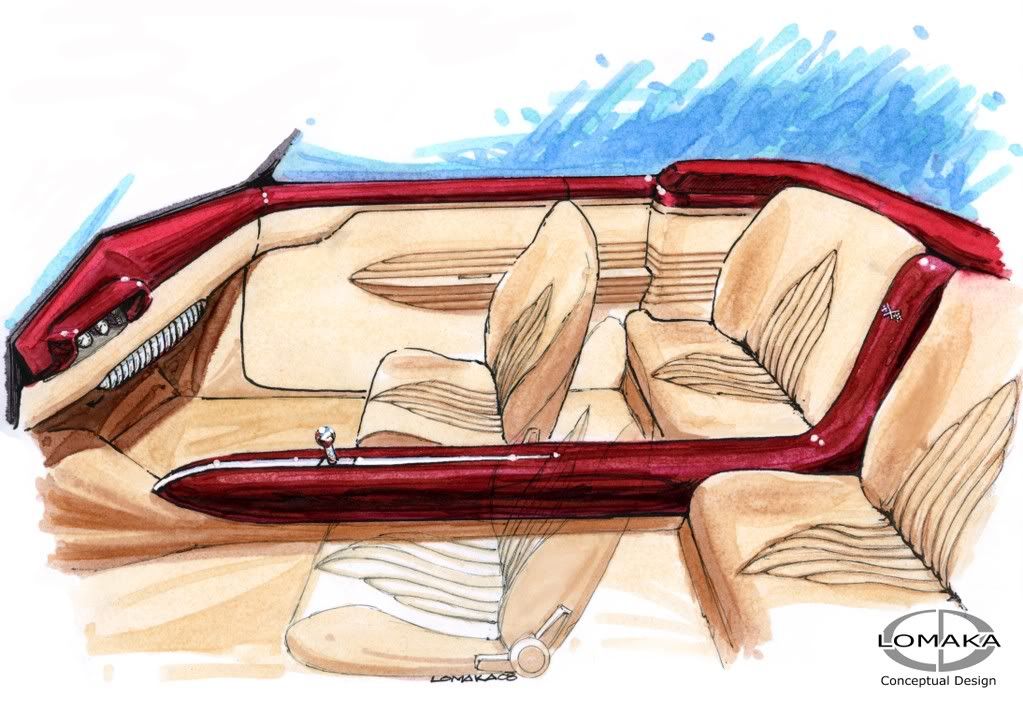
Slight two tone...

Change color of carpet...
I am working on one now that I painted a little in the background digitally (my first one with a big background- but it is to show the paint details you can't see on the rendering), but I have a friend coming over to give me a few more pointers.

__________________
Mike Lomaka
LCD
Lomaka Conceptual Design
http://mlomaka.wix.com/lomakaconceptdesign
Reply With Quote
  #7  
Old 02-08-2008, 02:27 PM
Yard Dawg's Avatar
Yard Dawg Yard Dawg is offline
Member
 
Join Date: Jun 2007
Location: USA>Tennessee
Posts: 69
Thanks: 0
Thanked 0 Times in 0 Posts
Default

I've posted something similar before...

I scan the sketch into Illustrator where I can true up the perspective and then it's off to Photoshop for color.


Hope that helps!
__________________
Steve L
Designer/Illustrator
& Auto Obsessionado
"The sooner you fall behind, the more time you'll have to catch up."
Reply With Quote
  #8  
Old 02-08-2008, 03:34 PM
ZVT's Avatar
ZVT ZVT is offline
Senior Member
 
Join Date: Jun 2007
Location: Floriduh!!
Posts: 198
Thanks: 0
Thanked 0 Times in 0 Posts
Default

Quote:
Originally Posted by Yard Dawg
I've posted something similar before...

I scan the sketch into Illustrator where I can true up the perspective and then it's off to Photoshop for color.


Hope that helps!

Yard dawg the line drawing/sketch in illustrator looks pretty jagged is it because you resized the picture or did it look like that in illustrator?

Z
__________________
ZVTDESIGNS-AUTOMOTIVE ARTIST AND VEHICLE DESIGN

[SIGPIC]https://lateral-g.net/forums/image.php4?type=sigpic&userid=4368&dateline=121287 1168[/SIGPIC]
RENDERING GALLERY!!
Reply With Quote
  #9  
Old 02-08-2008, 04:11 PM
Yard Dawg's Avatar
Yard Dawg Yard Dawg is offline
Member
 
Join Date: Jun 2007
Location: USA>Tennessee
Posts: 69
Thanks: 0
Thanked 0 Times in 0 Posts
Default

Quote:
Originally Posted by ZVT
Yard dawg the line drawing/sketch in illustrator looks pretty jagged is it because you resized the picture or did it look like that in illustrator?

Z
It's just from the resizing. That and PS rasterizing it I suppose.

Here's a close up.

__________________
Steve L
Designer/Illustrator
& Auto Obsessionado
"The sooner you fall behind, the more time you'll have to catch up."

Last edited by Yard Dawg; 02-08-2008 at 04:24 PM.
Reply With Quote
  #10  
Old 02-09-2008, 07:52 AM
Kris Horton's Avatar
Kris Horton Kris Horton is offline
Senior Member
 
Join Date: Jul 2004
Location: SoCal
Posts: 454
Thanks: 0
Thanked 0 Times in 0 Posts
Default

Quote:
Originally Posted by race-rodz
... would be kewl to have real renderings hangin in the office.
Yeah...I know what you mean...
__________________
Kris Horton
www.carsbykris.com
Reply With Quote
Reply


Posting Rules
You may not post new threads
You may not post replies
You may not post attachments
You may not edit your posts

BB code is On
Smilies are On
[IMG] code is On
HTML code is Off

Forum Jump


All times are GMT -7. The time now is 03:35 PM.


Powered by vBulletin® Version 3.8.11
Copyright ©2000 - 2025, vBulletin Solutions Inc.
Copyright Lateral-g.net