...

Go Back   Lateral-g Forums > Lateral-G Open Discussions > Artwork and Collectibles
User Name
Password


Reply
 
Thread Tools Display Modes
  #1  
Old 11-13-2008, 07:06 PM
tahoe_185 tahoe_185 is offline
Junior Member
 
Join Date: Oct 2008
Location: Virginia
Posts: 9
Thanks: 0
Thanked 0 Times in 0 Posts
Default

great tutorial. definitely some good tips. btw... to unlock the background layer in Photoshop, just doubleclick and rename.
Reply With Quote
  #2  
Old 11-13-2008, 09:05 PM
SRD Art's Avatar
SRD Art SRD Art is offline
Senior Member
 
Join Date: Jun 2008
Location: St. George, UT
Posts: 555
Thanks: 0
Thanked 63 Times in 29 Posts
Default

'been using photoshop for prolly 10 years and never knew that. Tried it and sure enough it worked. Thanks!
__________________
-Ben, Your friendly neighborhood Rendering dude, PM me for info!


My SRD Renderings Instagram page


My SRD Renderings Facebook Page

Pumkinator '79 Cutlass Wagon Build
Reply With Quote
  #3  
Old 11-14-2008, 01:02 PM
city_ofthe_south's Avatar
city_ofthe_south city_ofthe_south is offline
Senior Member
 
Join Date: Feb 2007
Posts: 428
Thanks: 0
Thanked 0 Times in 0 Posts
Default

If you "open" your Illustrator file with PS you don't have to worry about that background at all.

Good lookin tutorial. It's crazy how they seem to be happening all at once. Another forum I belong to just set up a place for them and I've been writing one for deviantart the past week. A bunch have been posted in various places as well. I guess this is a good reason to post one here too.

__________________
www.odellstudios.com ... it's turned in to more than cars.
Reply With Quote
  #4  
Old 11-15-2008, 05:49 AM
XcYZ's Avatar
XcYZ XcYZ is offline
Administrator
 
Join Date: Jun 2004
Location: Rochester, Minnesota
Posts: 8,998
Thanks: 0
Thanked 0 Times in 0 Posts
Default

That's way cool.
__________________
Scott

My LS7 69 Camaro
Reply With Quote
  #5  
Old 12-09-2008, 09:40 AM
city_ofthe_south's Avatar
city_ofthe_south city_ofthe_south is offline
Senior Member
 
Join Date: Feb 2007
Posts: 428
Thanks: 0
Thanked 0 Times in 0 Posts
Default Adobe Illustrator, Plymouth Cuda

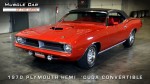
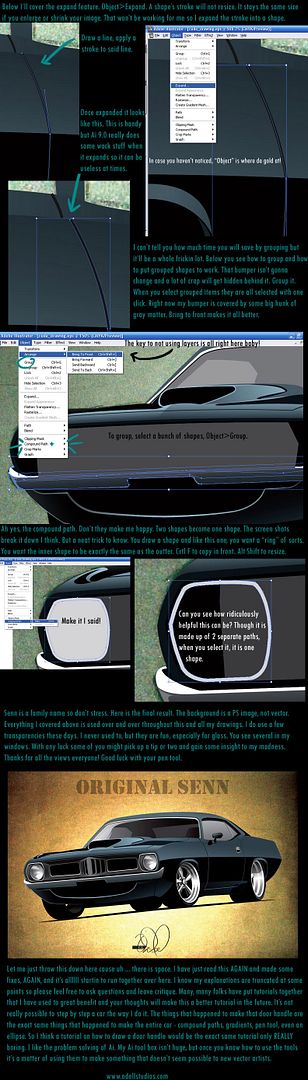
OK so I'm posting my tutorial. It is really more of a tips and tricks thing for artists who already use Ai or have a pretty good idea how to, rather than beginners.

__________________
www.odellstudios.com ... it's turned in to more than cars.
Reply With Quote
  #6  
Old 12-09-2008, 09:52 AM
city_ofthe_south's Avatar
city_ofthe_south city_ofthe_south is offline
Senior Member
 
Join Date: Feb 2007
Posts: 428
Thanks: 0
Thanked 0 Times in 0 Posts
Default

I might just add that the roof line of my Cuda was JACKED and the final version is slightly different from the car you see at the end of the tutorial. Hope this helps someone.
__________________
www.odellstudios.com ... it's turned in to more than cars.
Reply With Quote
  #7  
Old 06-16-2009, 03:13 PM
V8TV's Avatar
V8TV V8TV is offline
Lateral-g Supporting Vendor
 
Join Date: Nov 2005
Posts: 1,891
Thanks: 8
Thanked 32 Times in 21 Posts
Default

Great tutorials, guys. Thanks for taking the time to post 'em up!
__________________
Kevin Oeste
V8 Speed and Resto Shop
V8TV
Muscle Car Of The Week
V8 Radio Podcast

All about us:
https://www.v8speedshop.com

Reply With Quote
Reply

Thread Tools
Display Modes

Posting Rules
You may not post new threads
You may not post replies
You may not post attachments
You may not edit your posts

BB code is On
Smilies are On
[IMG] code is On
HTML code is Off

Forum Jump


All times are GMT -7. The time now is 03:12 PM.


Powered by vBulletin® Version 3.8.11
Copyright ©2000 - 2026, vBulletin Solutions Inc.
Copyright Lateral-g.net